
03 / 03
sidurofe
Shifts for doctors: a requirement for every hour, self sign-up and swaps with validation.
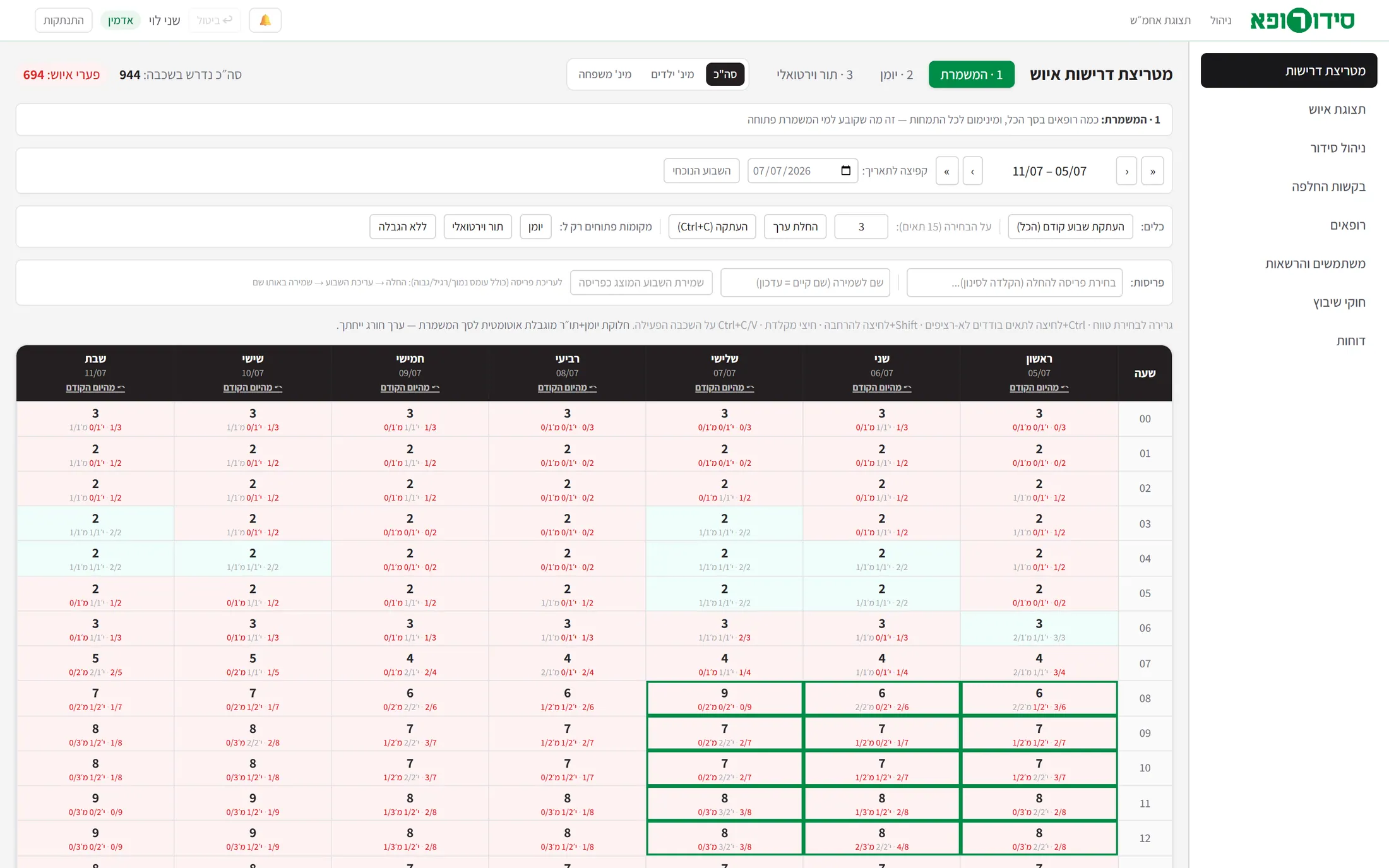
A working prototype of a shifts system for doctors in a medical service that runs around the clock. You set how many doctors are needed in every hour, the doctors sign up themselves, and a supervisor and an administrator see, assign and approve swaps. Real sign-in, permissions and a server - and a visual design still to come.
Note Every doctor, supervisor and administrator on the screens is an invented account from the prototype’s demo data, and the screens were captured from a clean copy of it with a fresh database. The interface is grey and neutral on purpose: this is an operational wireframe, and its visual language has not been designed yet. This is written for development, information systems and management.
- My contribution
- Specification, the logo and the opening animation, and direction of the build with Claude Code.
- Discipline
- Creative Labs · UI/UX
- Product state
- Prototype · Private demo
01
Where it stands
sidurofe is an interactive wireframe that really works: a server, a database, sign-in by role, and permissions enforced on the server - with demo data. It was built to prove the operating logic and the flows before anyone designs: grey on purpose, with the final visual design still ahead.
- Idea
- Working wireframe
- Visual design
- Production back end
- Controlled pilot
- In daily use
Today: a wireframe that runs end to end with three roles. Next: the visual design (a Figma kit is ready), and in parallel the product decisions that were left open.
Works today
Three roles with real sign-in: doctor, supervisor and administrator
Salted password hashes, a signed session cookie, and every action checked on the server by role and ownership.
A staffing requirement for every hour, with specialty floors that keep places
Availability is decided at the shift level only; assigning to the calendar and the virtual queue is planning for the administrator and does not affect availability.
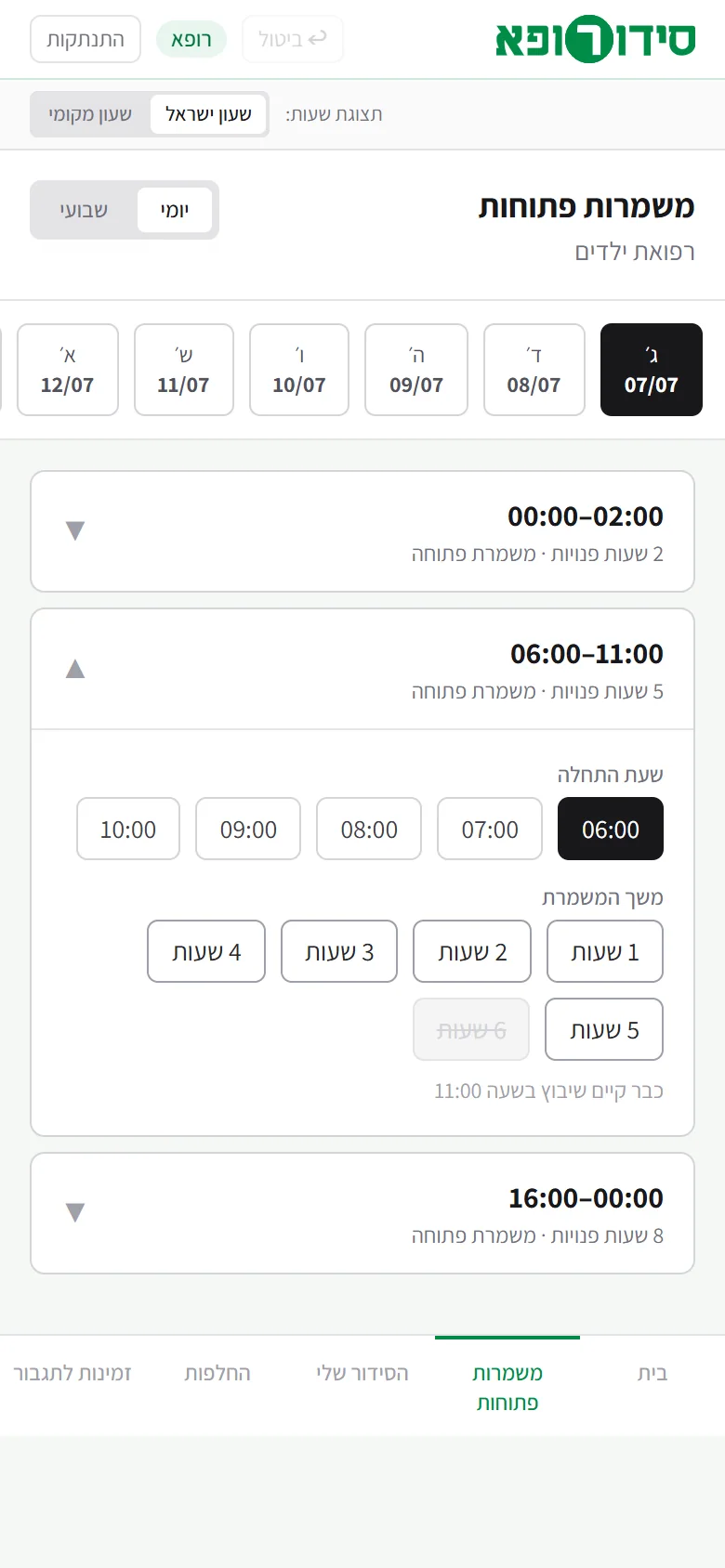
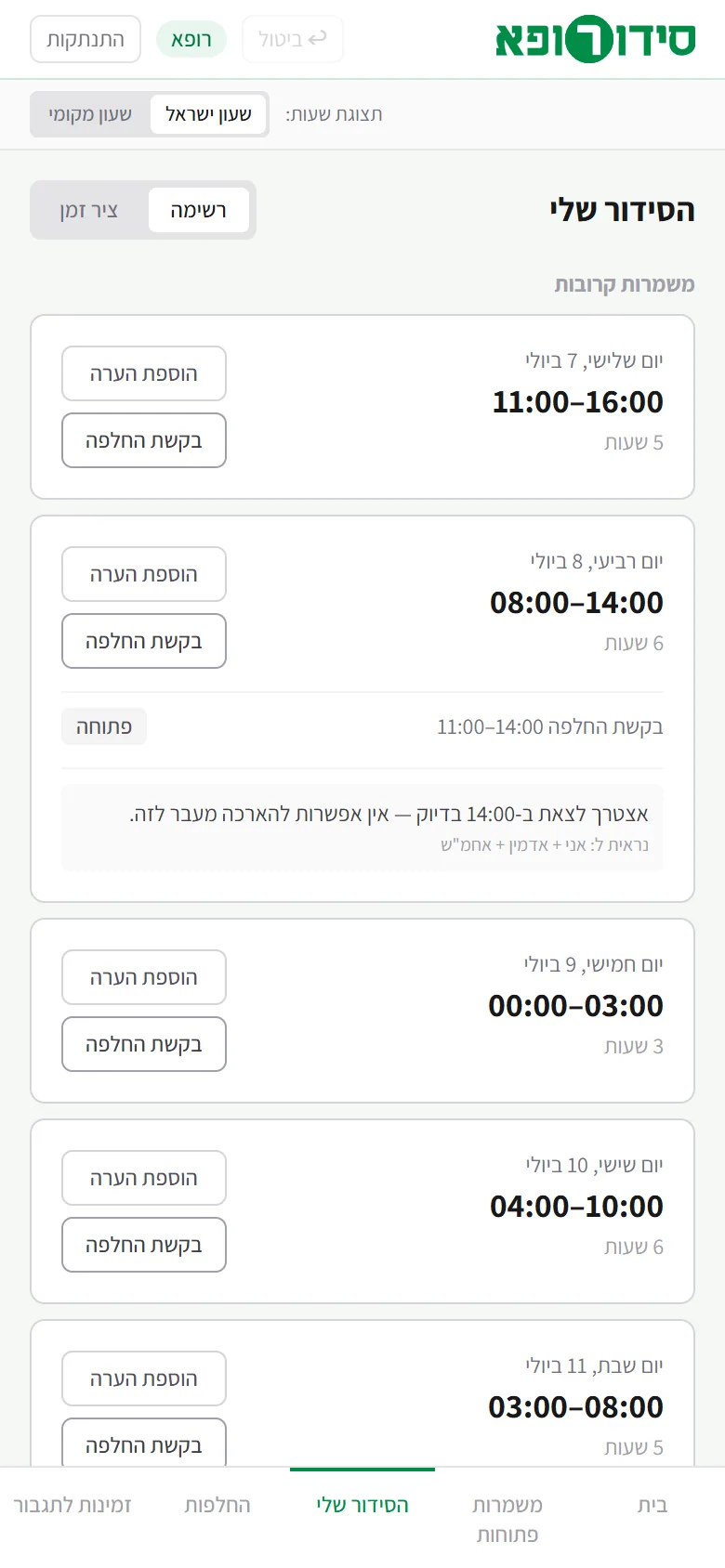
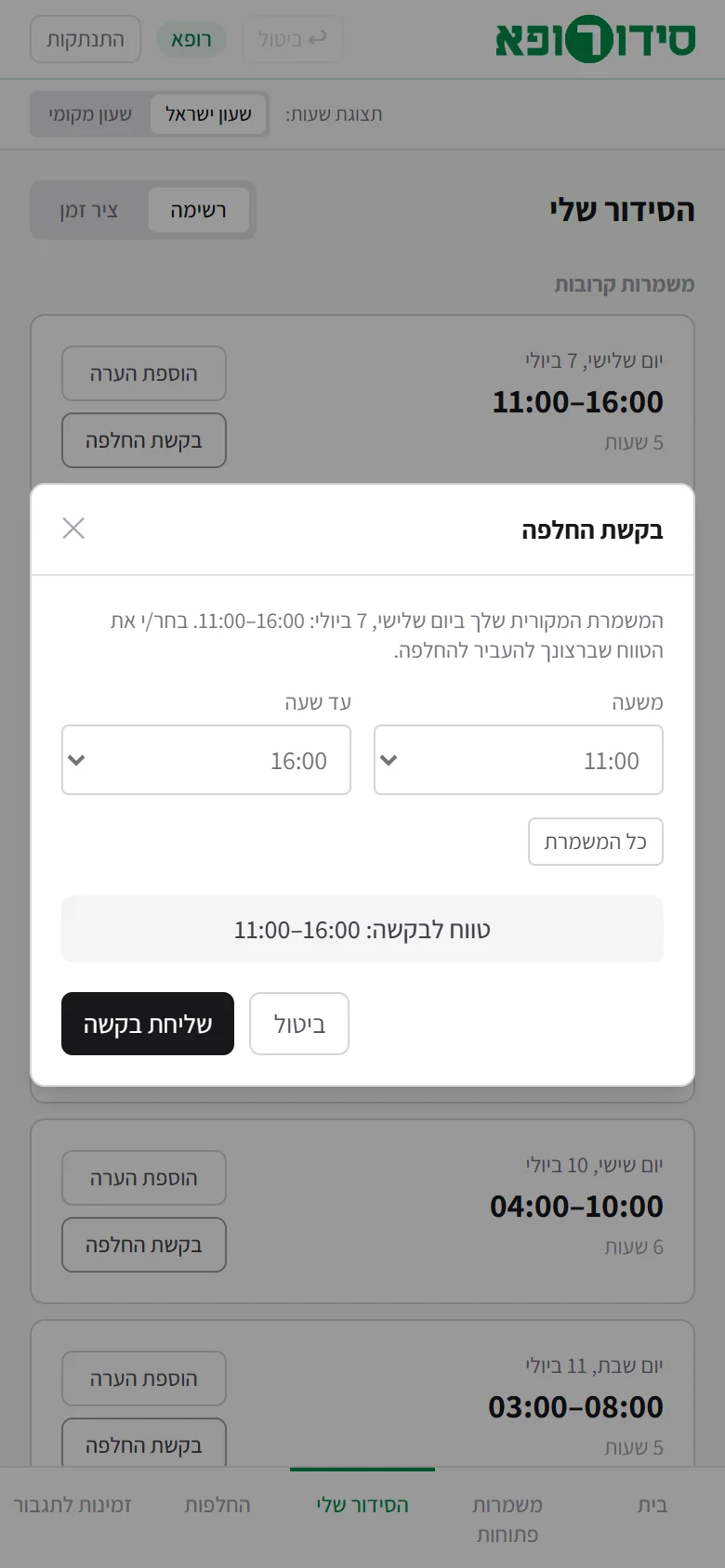
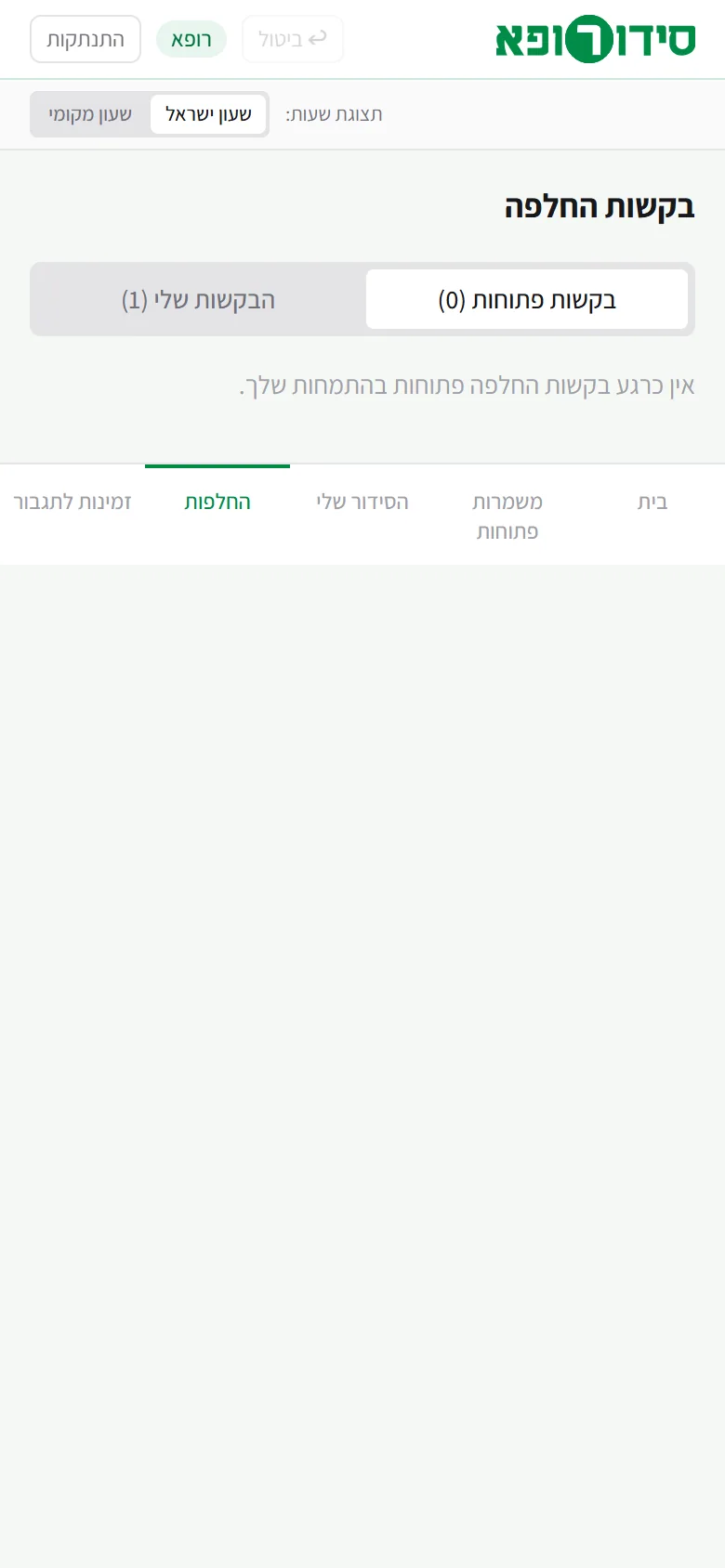
A doctor’s mobile app: open shifts, my schedule, swaps and availability for reinforcement
Information separated on the server: a doctor never receives other doctors’ names
Other people’s shifts arrive anonymous, only for working out occupancy; supervisor notes and reinforcement data do not arrive at all.
Swaps with six checks before approval
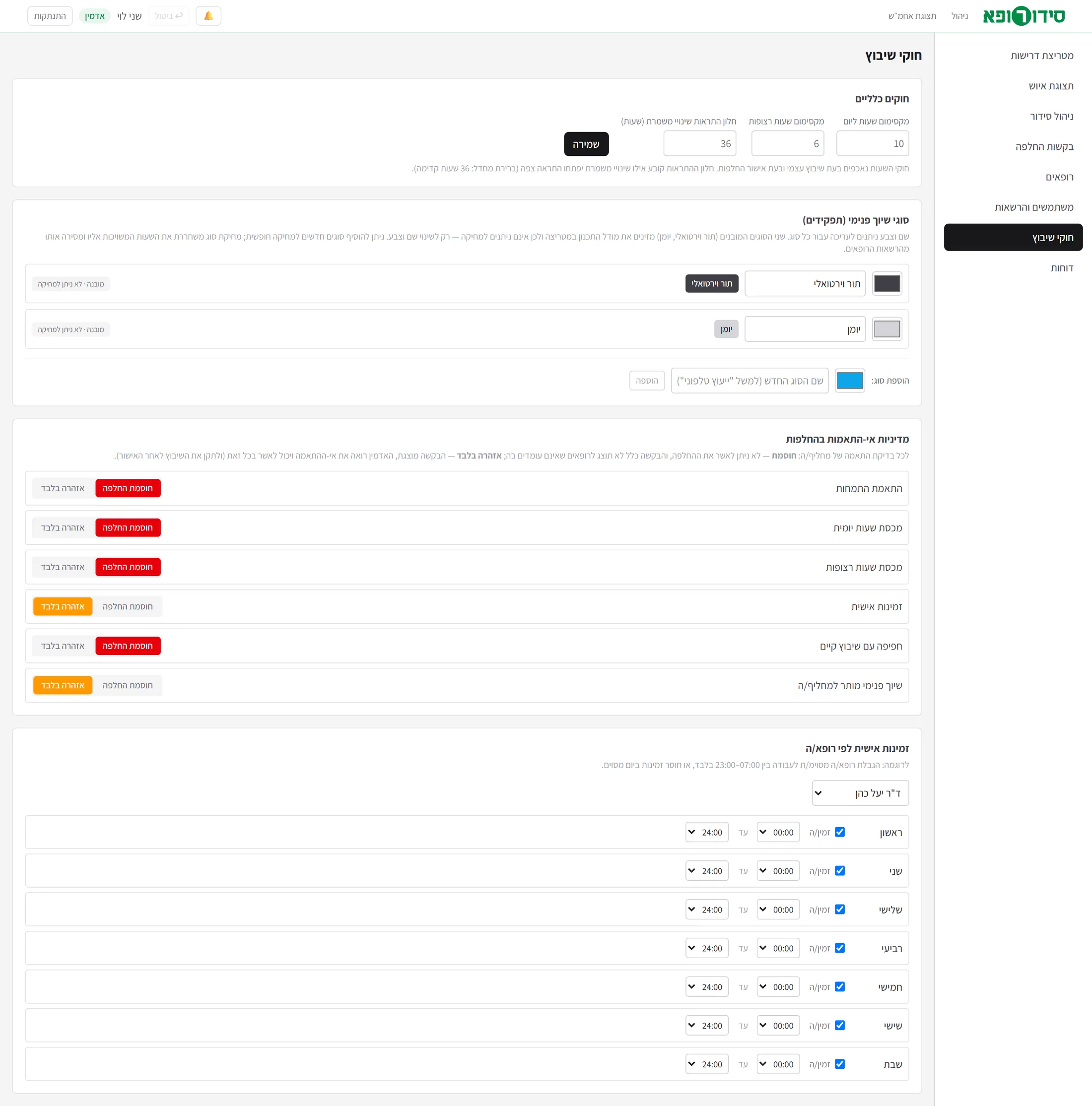
Each check has a policy: blocking, or a warning only.
Undo of the last action, and notifications of shift changes within a configurable time window
A Figma kit ready: tokens, components and a build guide
Needed to be fully functional
The visual design in Figma, following the token and component kitDesign
Seven key screen skeletons; the rest are composed from them. The wireframe stays beside Figma as the interactive specification.
A production data layer: relational tables instead of one documentDev
Today the doctors’ domain is stored as one JSON document managed by the reducer - enough for a prototype. The model is already defined, and has to be normalised.
Organisational sign-in instead of demo accounts, and a password resetIS
Today every demo account shares one password, and a reset goes only through the administrator.
Real notifications to doctors by e-mail, and an Excel file that is really producedDev
Today the e-mail is simulated, and the Excel export is a complete preview (columns, format, split by assignment) without a file.
Hosting with persistent storage, backup and an audit logIS
On the demo host’s free tier the database resets at every restart - convenient for a demo, not for real use. An audit log (who changed what and when) is proposed and not built yet.
Six open product questionsManagement
For example: partial approval of a swap, several volunteers for one request, and cancelling your own shift - see the end.
What has not been tested: use by real doctors, production data, the load of around a hundred and fifty doctors (for which the by-name selection and filtering were designed), and accessibility. “Today’s date” in the demo is fixed on purpose, so that the story stays consistent.
02
From the pain to the product
How we got from “a doctor is needed in every hour” to a wireframe you can click. The story is reconstructed from the product’s documentation.
The pain
A service that runs round the clock, and scheduling done by hand
When a doctor is needed in every hour of the day, with a minimum of each specialty in every hour, it is hard to know what is missing, who can cover and which track someone belongs to. The gaps are found late, usually by phone.
The approach
Not drawing screens - building a wireframe that works
Instead of static pictures, a prototype with real roles, permissions and logic, grey on purpose. That way the architecture, the flows and the operating logic are tested before colours are chosen.
The truth
The real unit is a doctor-hour
Instead of storing “shifts”, the assignment of a doctor to a single hour is stored. A continuous shift on any screen is the result of joining consecutive hours, and never a stored entity - so no two screens show two truths.
The rules
A requirement for every hour, and floors that keep a place
Each hour has a total and a minimum for each specialty; the specialty floor keeps places so that free sign-up does not leave the last places to the wrong specialty.
The server
The same logic in the browser and on the server
One pure reducer runs in both places: an instant update in the browser and persistence on the server, which also checks permission for each action and filters the information by role.
The brand
A logo, an opening animation and a design kit
Steve designed the logo and the opening animation. Beside them a Figma build guide and a plugin that builds tokens and components were written, so that the visual layer is composition and not drawing every screen.
Today
A working wireframe, waiting for design and decisions
What remains is design, a production data layer, and a few product questions that were defined and left open.
03
How the system works
The heart of the system is the requirement model. Each hour has two separate layers: first the shift, which decides for whom the hour is open to self sign-up; then the assignment plan - guidance for the administrator only, which does not change availability.
A specialty floor keeps places. Take 10 places with a minimum of 2 pediatricians: as soon as 8 family doctors have signed up, the remaining places are offered only to pediatricians, and a doctor whose floor is not yet filled always has a place kept.
- In
The requirement for an hour
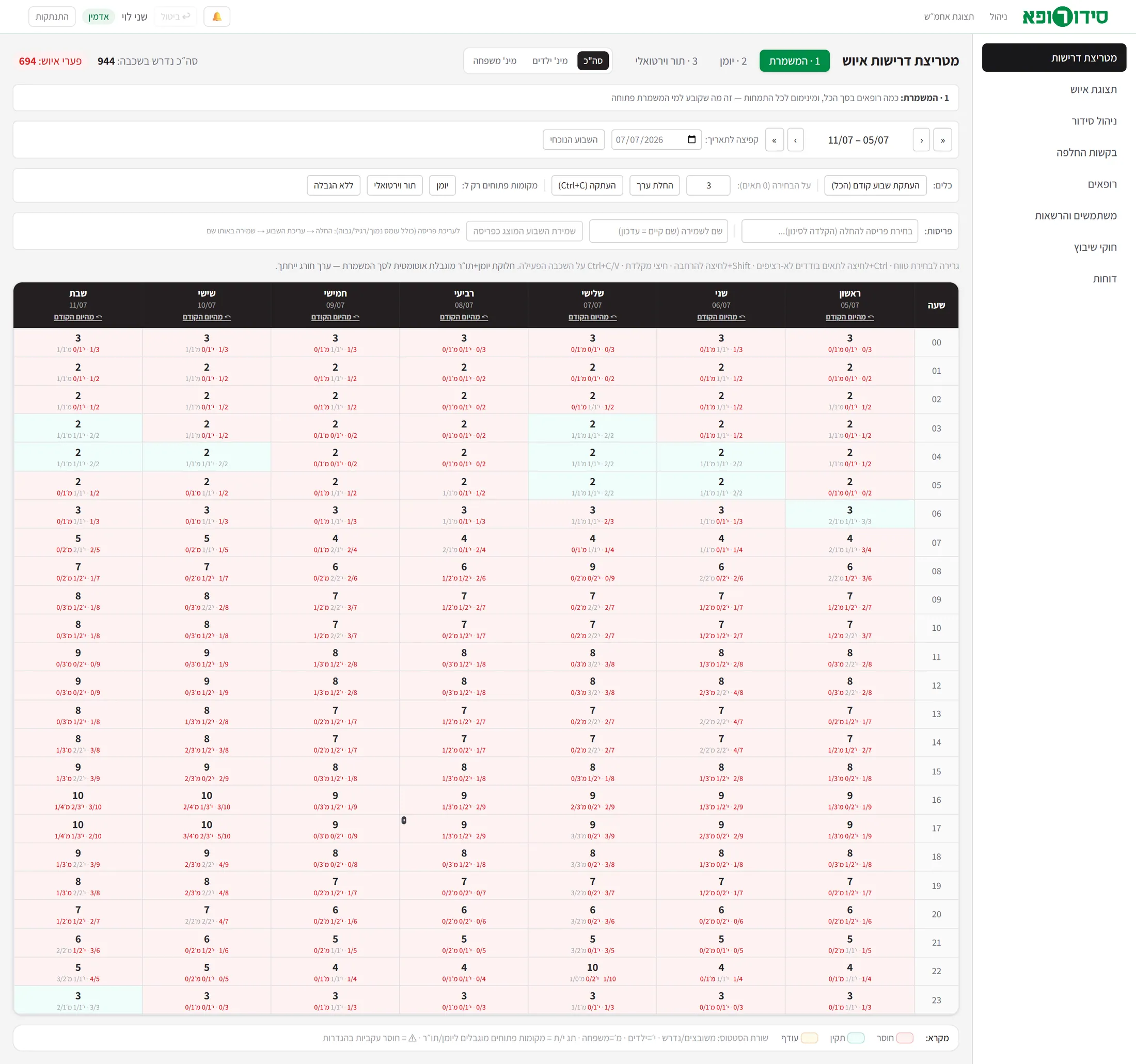
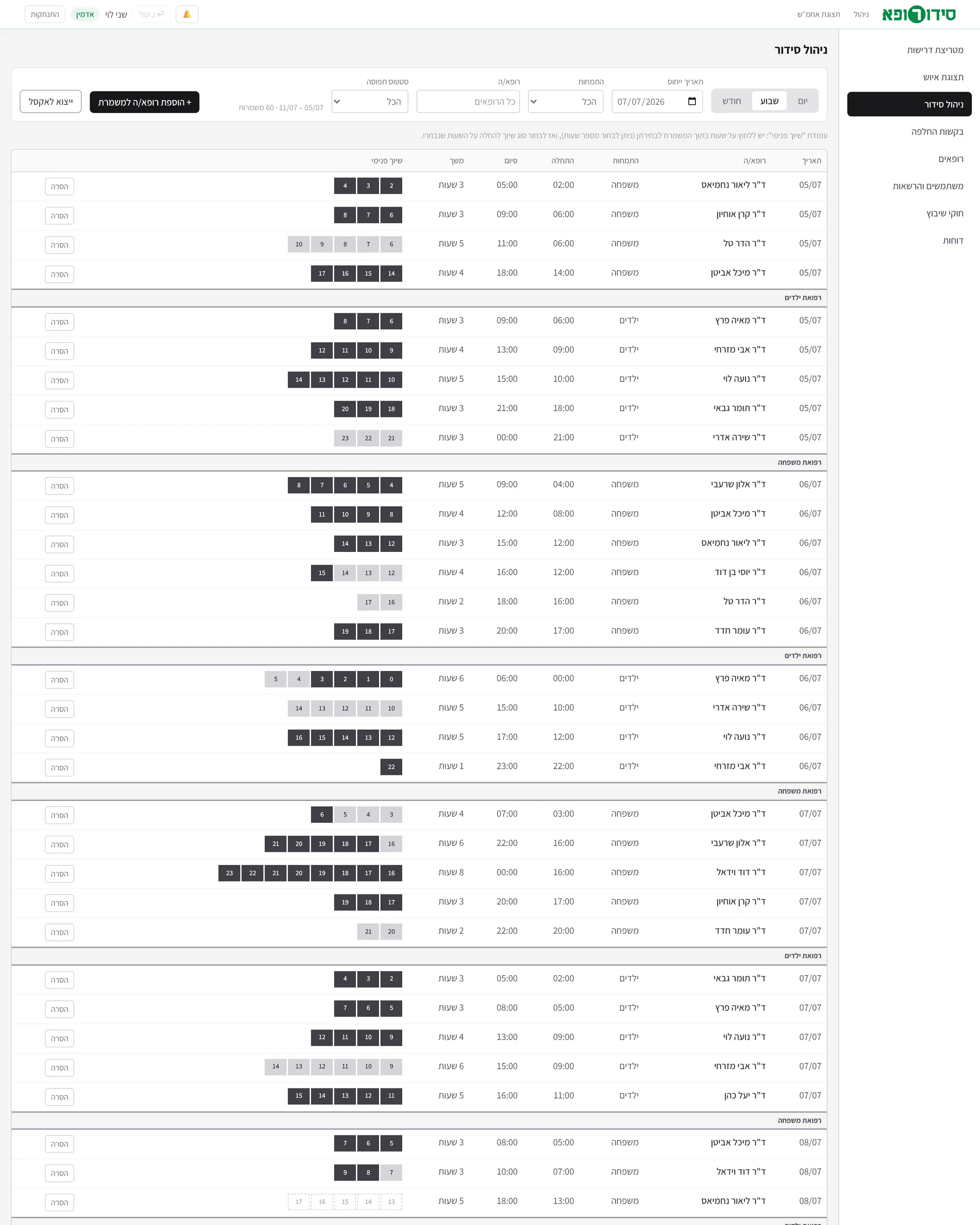
The total, a minimum of pediatricians and a minimum of family doctors. The administrator edits in the matrix: drag, non-contiguous cells, copying a day or a week, and saved layouts.
- Step
Availability
Decided at the shift level only. The specialty floors keep places, and open places can be limited to a certain role.
- Step
Sign-up
The doctor chooses a start time and a length inside an open window, and enters the shift’s pool without an assignment - “not yet assigned”.
- Step
Internal assignment
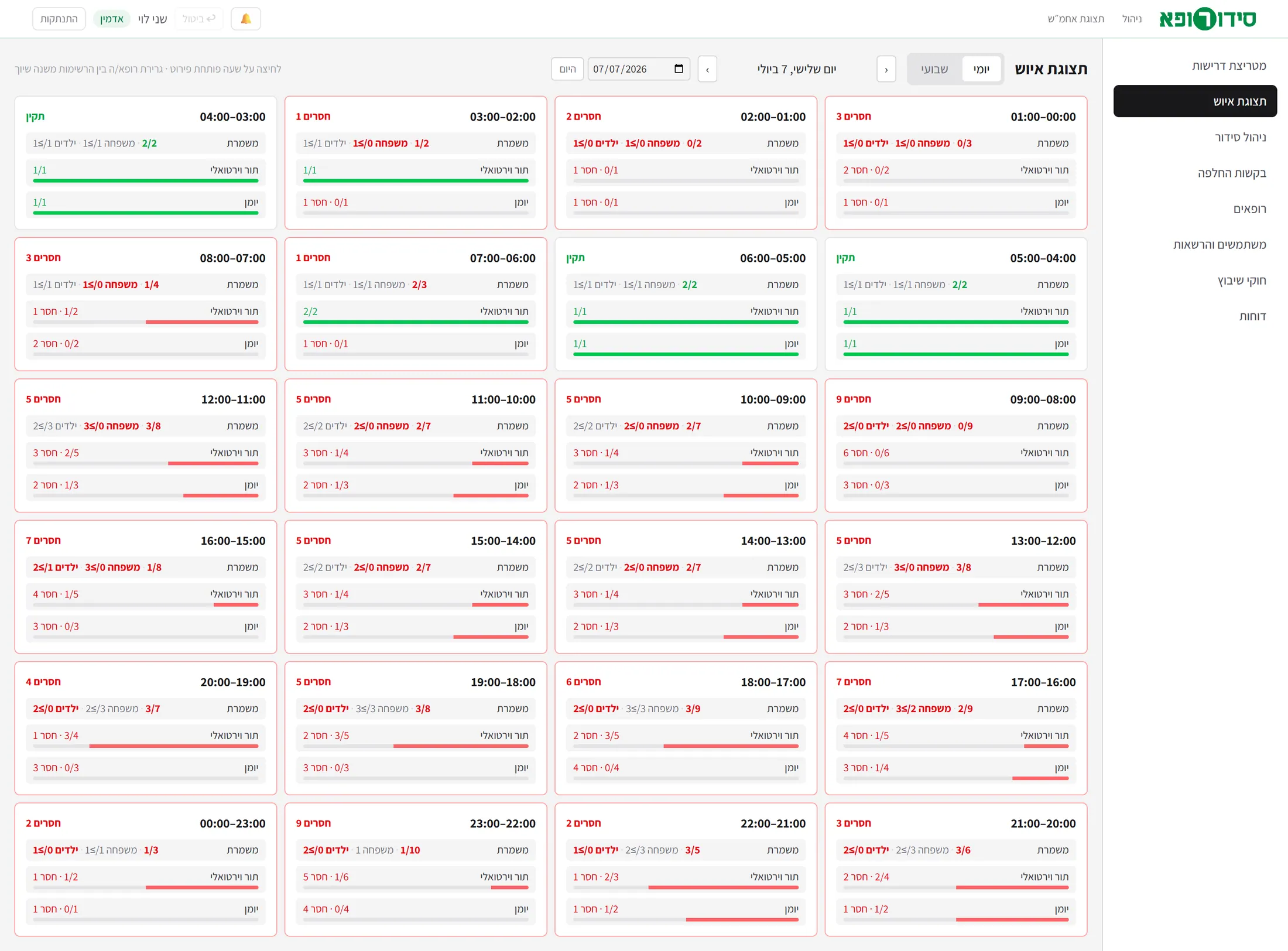
The administrator assigns the hours to the calendar, the virtual queue or a custom type - by click or by drag. Progress bars show how much is missing in each type.
- Step
A swap
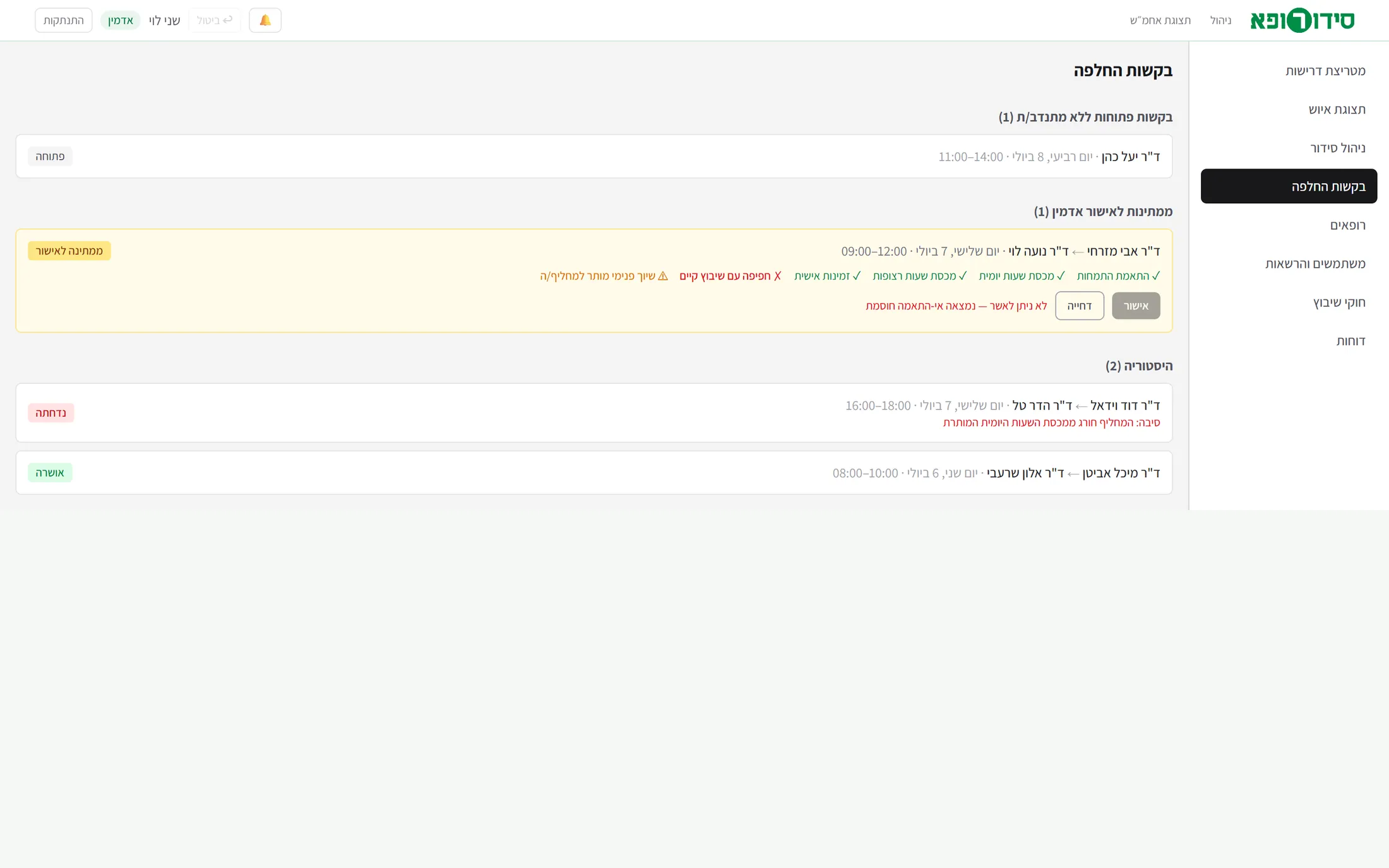
A request is opened to volunteers, with no names. Before approval six checks run, each with a policy: blocking or a warning.
Specialty matchCheck 1
Daily hours quotaCheck 2
Consecutive hours quotaCheck 3
Personal availabilityCheck 4
Overlap with an existing shiftCheck 5
The internal assignment is allowed for the replacementCheck 6
- Out
Notifications and undo
A change inside the configured window (36 hours ahead by default) pops up a notification for the administrator and the supervisor. Undo reverses the last action, and is blocked if somebody else acted after it.
04
Who sees and who does what
Enforcement is double: both in the browser’s routing and on the server, which filters the information by role and checks every action.
| Capability | Doctor | Supervisor | Administrator |
|---|---|---|---|
| Staffing requirements | No | view (staffing view) | edit |
| Other doctors’ names | no - anonymous | Yes | Yes |
| Internal assignment | No | view | edit |
| Supervisor notes | No | create and view | view |
| Doctor notes | his or her own only | at the “administrator and supervisor” level | both levels |
| A reinforcement shift | No | Yes | Yes |
| Approving or rejecting swaps | No | No | Yes |
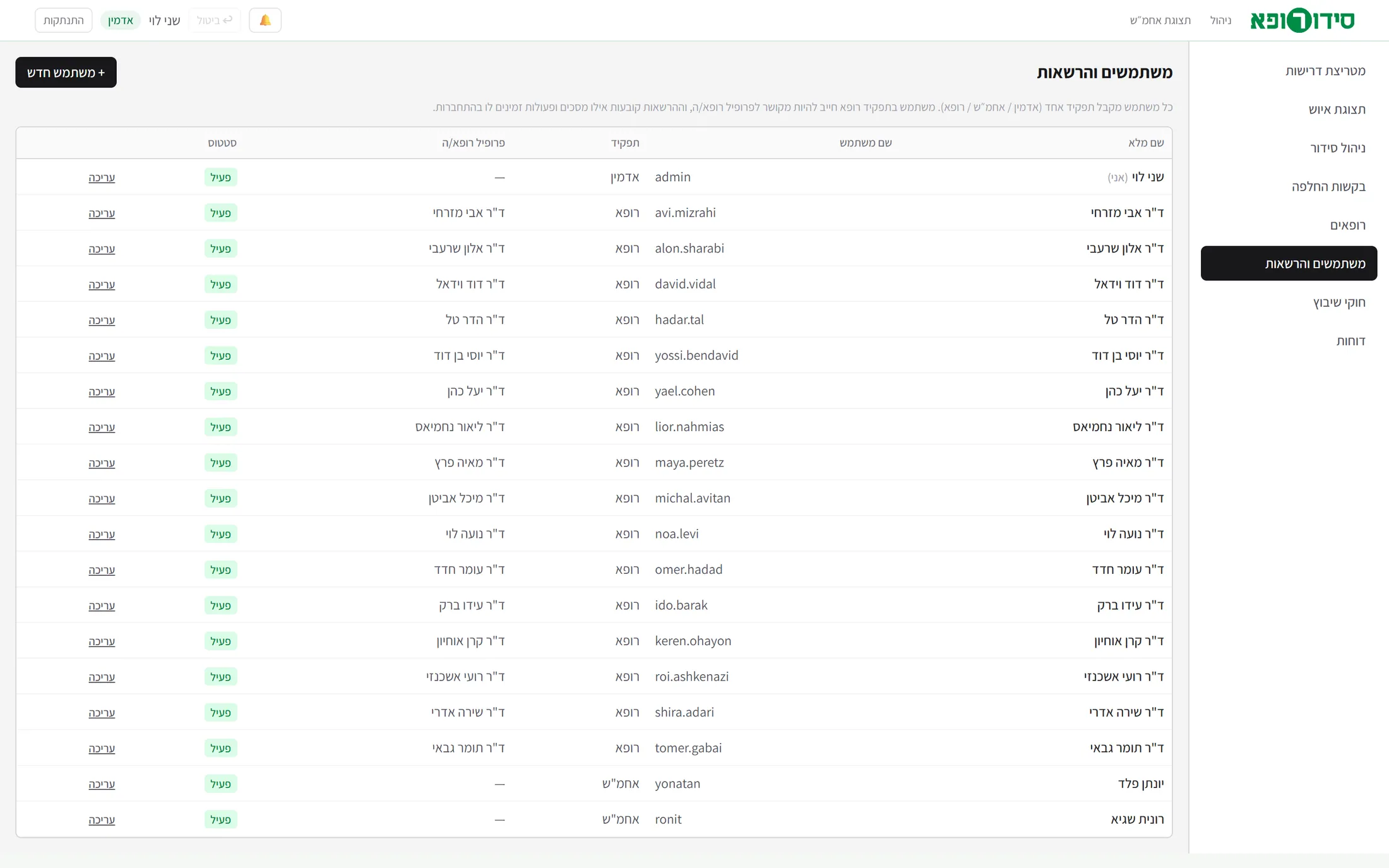
| Managing doctors, users and rules | No | No | Yes |
Drag actions (moving a shift, changing an assignment) are reserved for the administrator and always come with a confirmation window.
05
The administrator: requirements, staffing and management
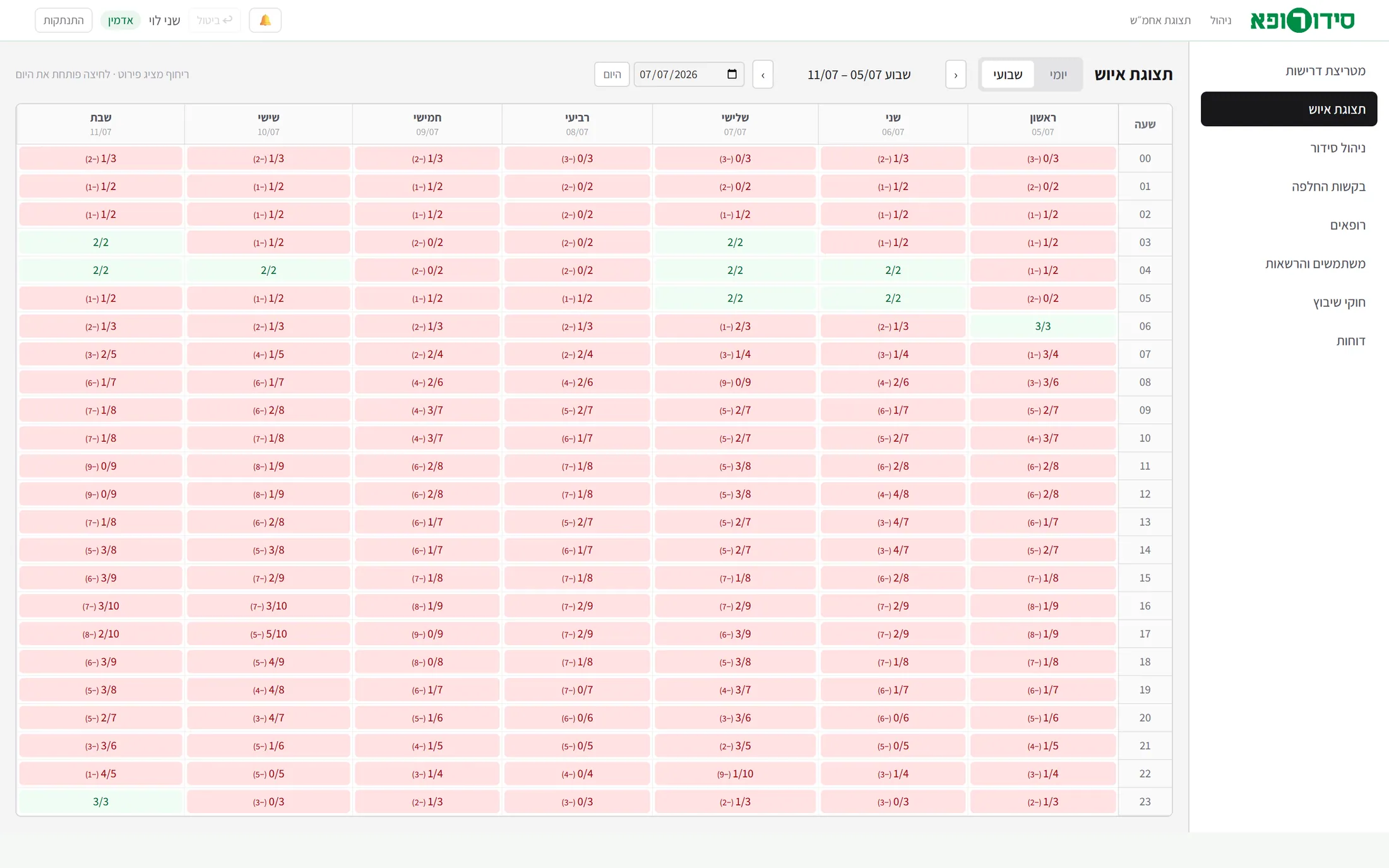
Screenshots from the wireframe running on its demo data. Click a screen to scroll inside it.
Tap to scroll the page insideClick to scroll the page inside
Tap to scroll the page insideClick to scroll the page inside
Tap to scroll the page insideClick to scroll the page inside
Tap to scroll the page insideClick to scroll the page inside
Tap to scroll the page insideClick to scroll the page inside
Tap to scroll the page insideClick to scroll the page inside
Tap to scroll the page insideClick to scroll the page inside
06
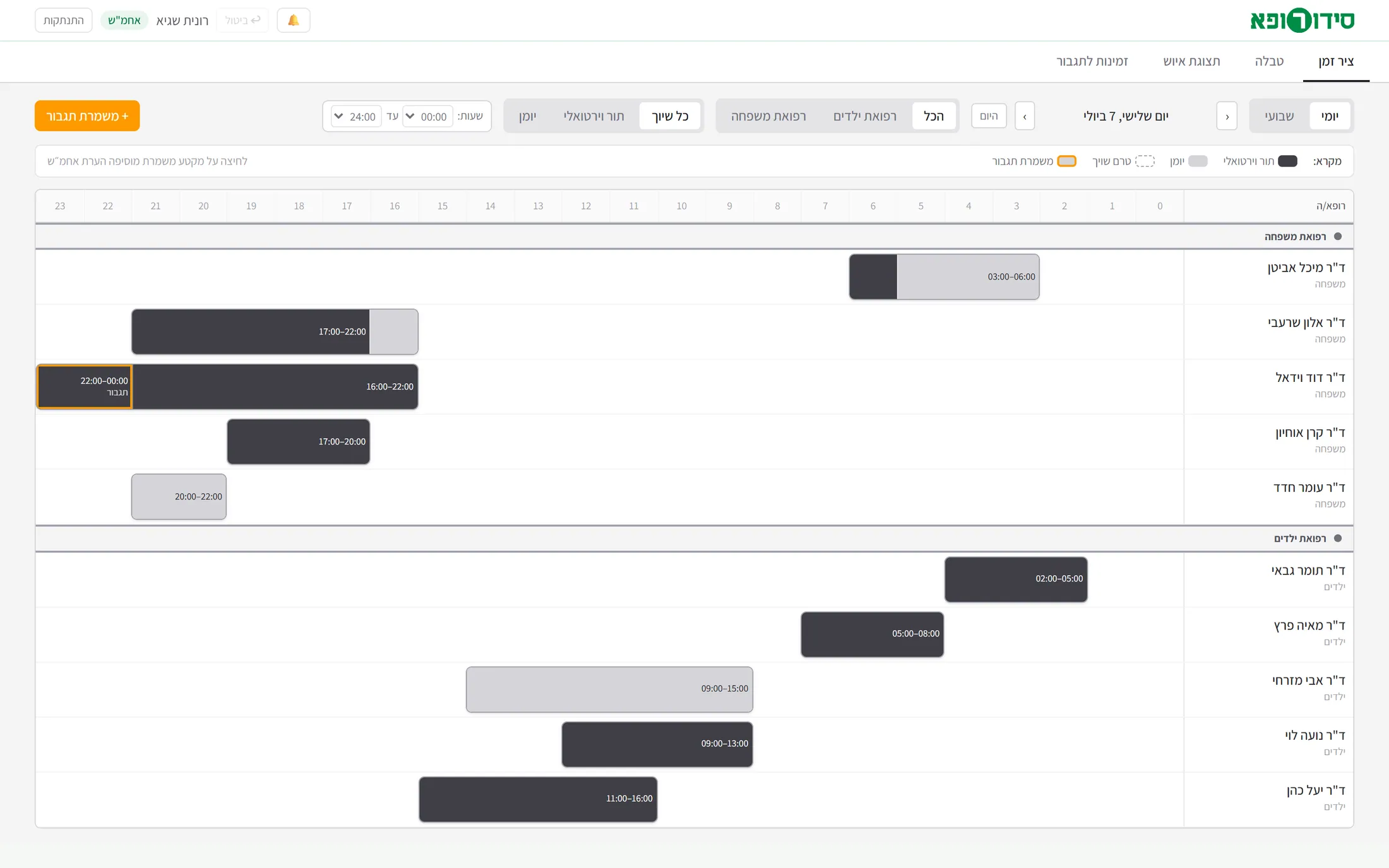
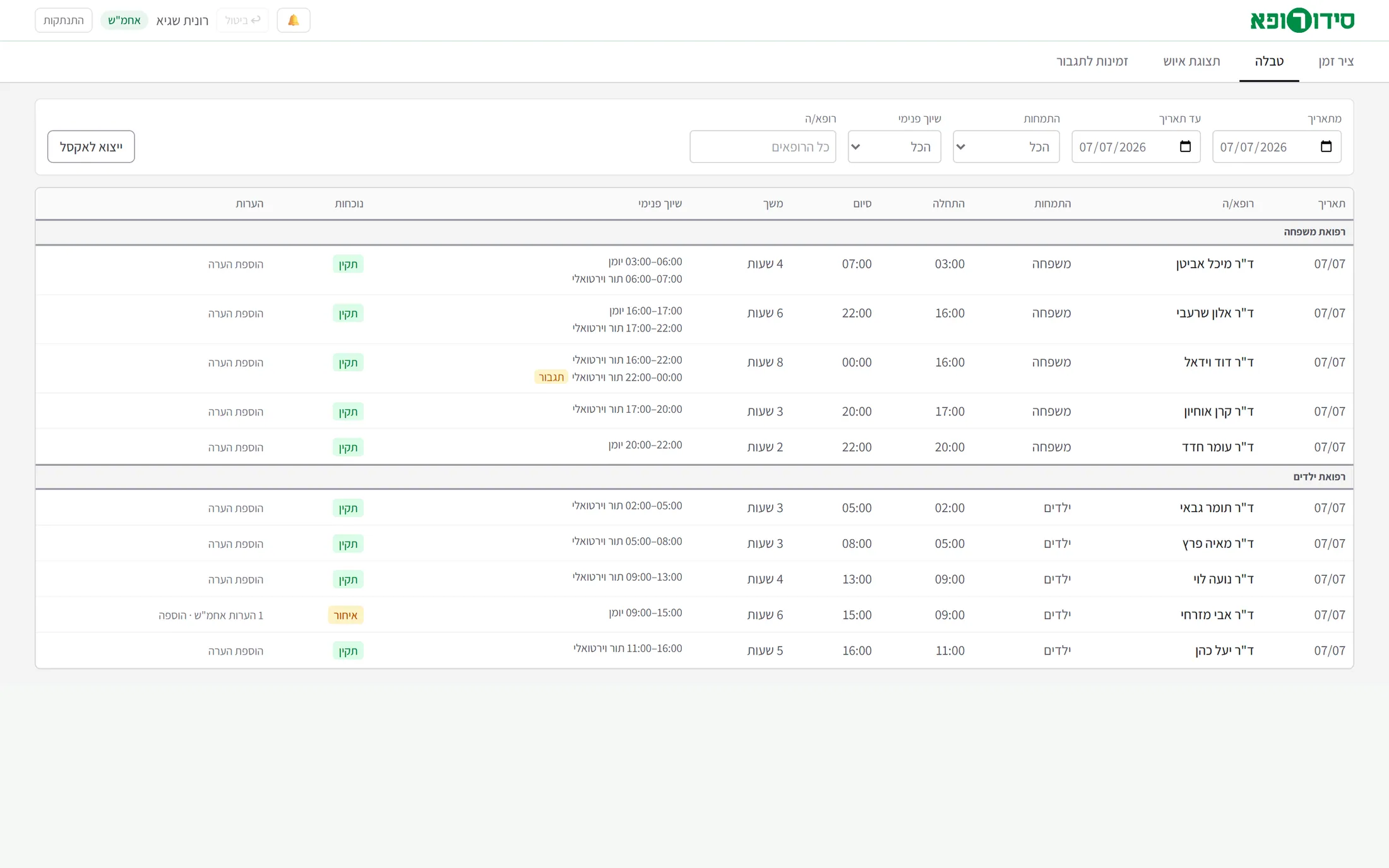
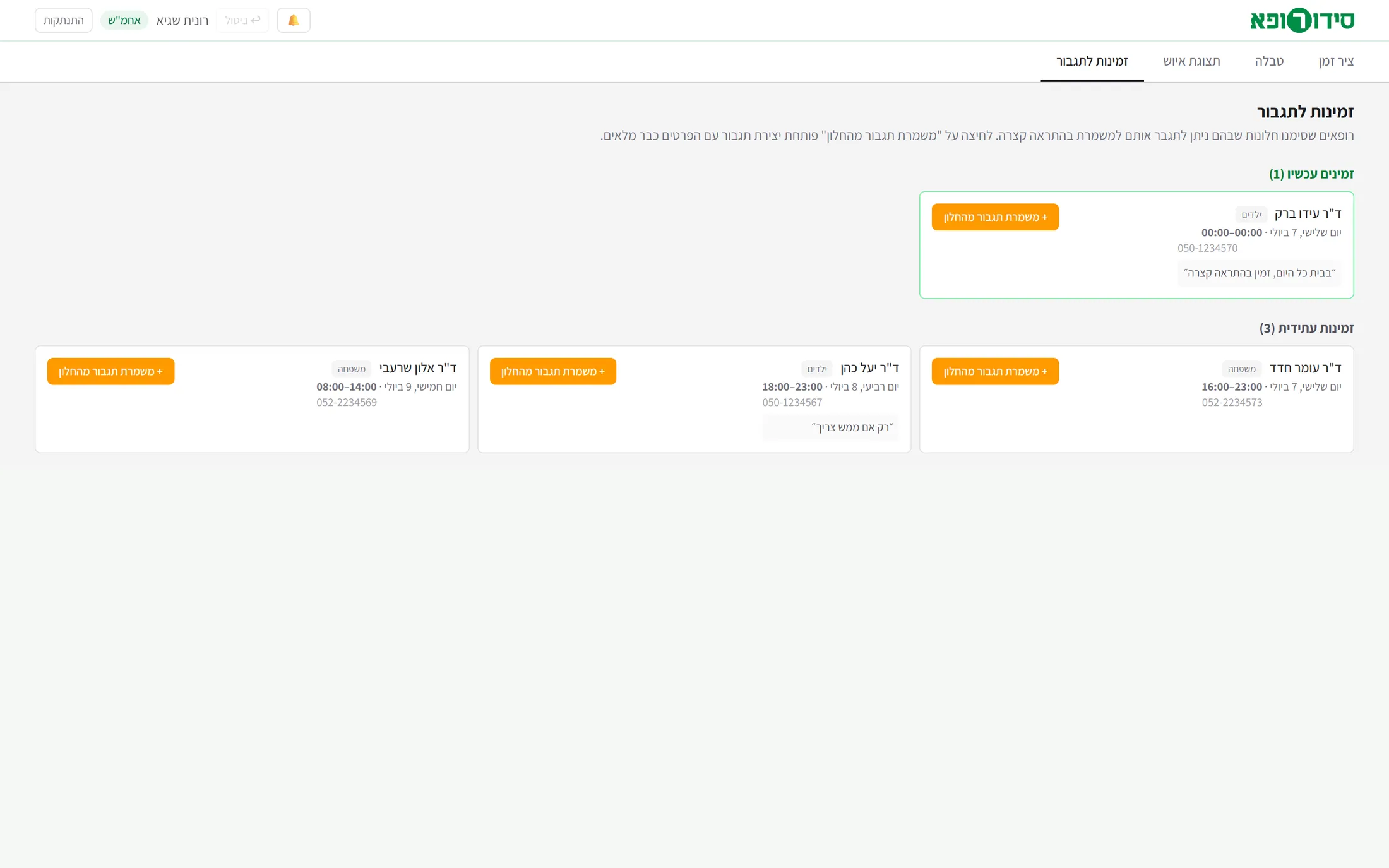
The supervisor: timeline, table and reinforcement availability
The supervisor sees every name, creates reinforcement shifts and adds notes, and does not edit requirements or approve swaps.
Tap to scroll the page insideClick to scroll the page inside
Tap to scroll the page insideClick to scroll the page inside
Tap to scroll the page insideClick to scroll the page inside
07
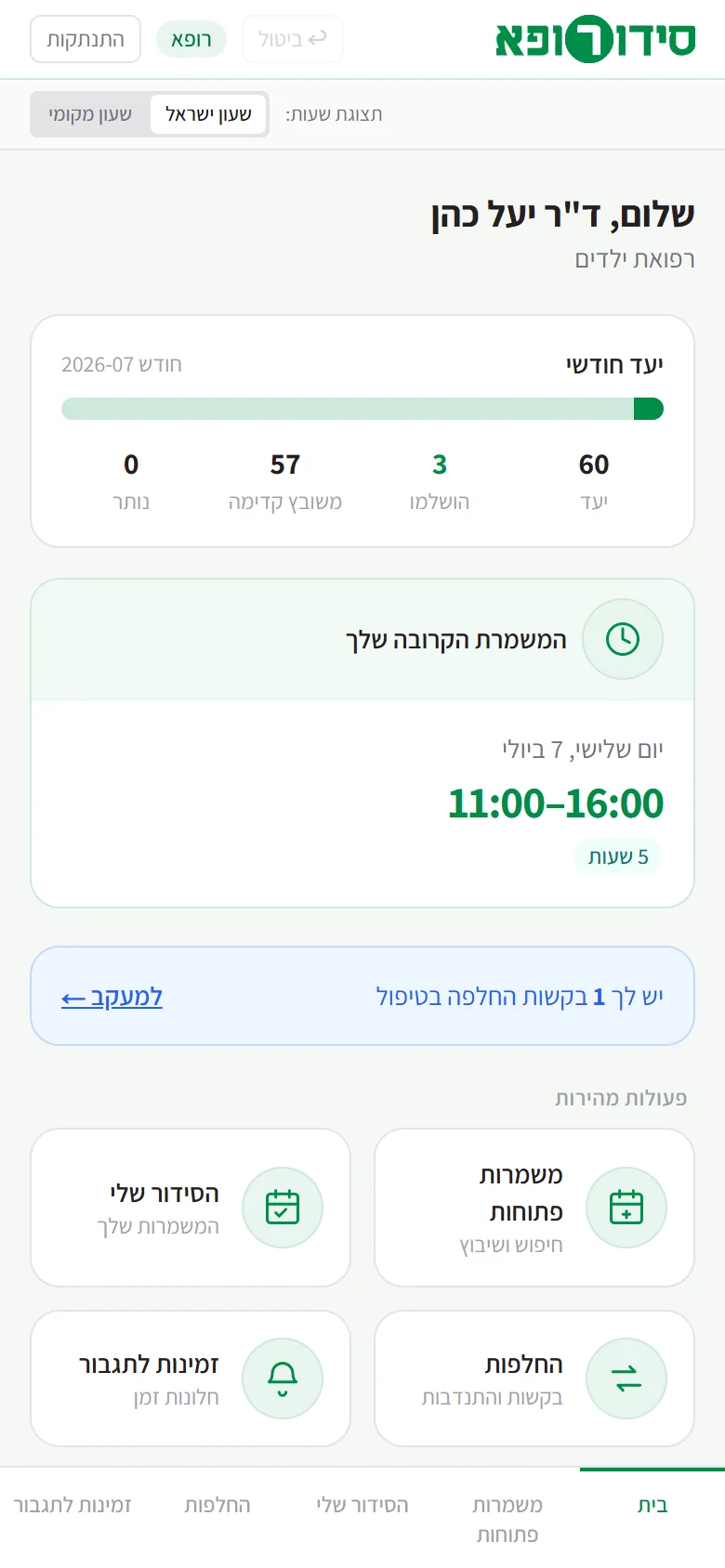
The doctor: mobile first
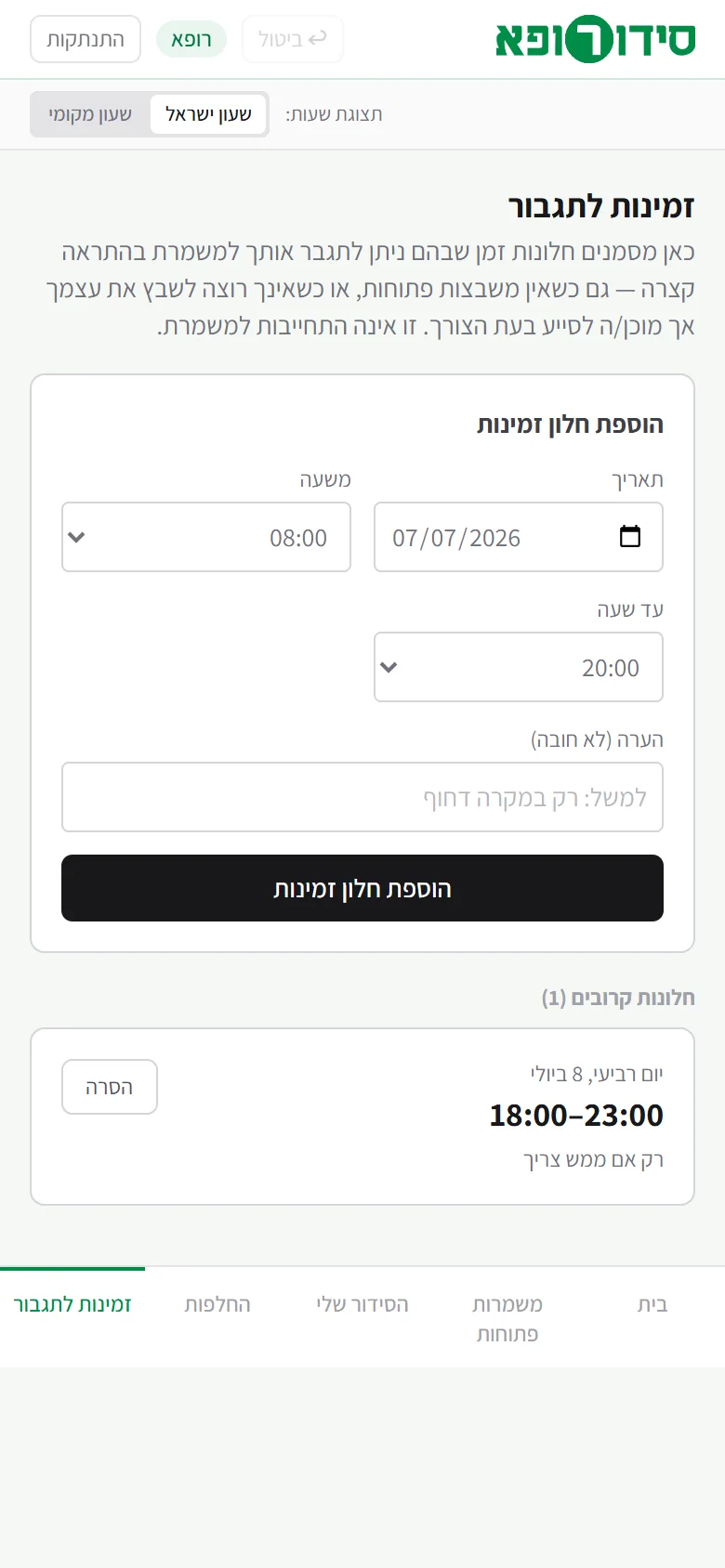
The doctor’s app is designed for the phone first: home, open shifts, my schedule, swaps and availability for reinforcement. A doctor abroad can see hours in local time - a display conversion only, and the data stays in Israeli time.
08
Cracks and fixes
Design and logic decisions that grew out of real problems of an operational system.
The problem
A “shift” means different things on different screens.
The fix
Only the doctor-hour is stored. Every shift on every screen is a join of consecutive hours and never an entity of its own.
The problem
Free sign-up can leave the last places to the wrong specialty.
The fix
Specialty floors keep places: with 10 places and a minimum of 2 pediatricians, after 8 family doctors the remaining places open to pediatricians only.
The problem
The planning numbers (calendar and virtual queue) can contradict the shift total.
The fix
A hard constraint: the split never exceeds the shift total. An excess is cut automatically by the same reducer, in the browser and on the server alike.
The problem
Doctors should not see other doctors’ names.
The fix
The server filters the state by role: other people’s shifts arrive anonymous, only for working out occupancy; supervisor notes and reinforcement data never arrive. Enforcement is double: routing and server.
The problem
An undo can quietly erase someone else’s change.
The fix
A strict last-in-first-out undo (up to 30 states): if another user acted after you, the undo is blocked.
The problem
Approving a swap needs more than “looks fine”.
The fix
Six checks before approval, each with a policy: blocking (the request is even hidden on the server from doctors who do not pass) or a warning only, which the administrator can still approve.
The problem
Hour ranges on a Hebrew page came out reversed (16:00-21:00).
The fix
Every numeric range is wrapped in a direction isolate, and a check on a real screen with real content was added to the design guide.
The problem
The brand green could be read as “all is well”.
The fix
The status palette was shifted on purpose: sound in teal, short in red, over in amber - so that “our brand” is never “this is fine”.
The problem
The database on the host’s free tier resets.
The fix
It became a feature of the demo - it always returns to the demo data. For production: a persistent disk or a managed database, a small change in one layer.
09
Brand, splash and motion
The logo and the opening animation are Steve’s: a word with the letter resh inside a green circle at its heart, which in the opening settles in letter by letter. The interface itself is grey and neutral on purpose - density is the identity, so tight padding, modest corners and minimal shadows - until the visual language is designed in Figma.

- Brand green#008C47Identity, navigation and primary actions
- Dark green#00713APressed and emphasis
- Warm ink#231F20Text
- Ground#F5F8F5The app background
- Sound#0D9488Teal, deliberately different from the brand green
- Short · Over#DC2626plus #d97706 for over and #2563eb for information
Type
- Assistant a Hebrew interface face; the design kit advises choosing a brand face with tabular figures
Design rules
- Density is the identity: this is an operational tool, not a marketing dashboard.
- The colours of the assignment types are data the administrator edits, so they are a swappable colour slot and not a fixed value.
- The meaning of the status (short, sound, over) is a functional signal and not decoration, and has to stay unambiguous after the design.
- RTL everywhere, and horizontal scrolling in the matrix and the timeline as a defined pattern and not a flaw.
10
Tools and how they fit
Two audiences, two ways: for the development team - the code in a private repository; for management - a live application in the cloud that opens from any computer.
01
Specify
The specification in Claude is based on a specification document: an architecture note and a requirement model written as the work goes, including open questions.
- Claude Codethe specification conversation, based on the specification document, the build and the documentation
- Figmawireframes
02
Build
Server and interface in one project, with no external interface libraries.
- Next.js · React · TypeScriptthe interface and the API layer
- Tailwind CSSstyling; every component was built from scratch
- SQLite (node:sqlite)a built-in database, with no native dependency
03
Brand and motion
Steve’s logo and animation, embedded in the interface.
- Illustratorcreating the logo
- After Effectsthe opening animation
- Lottieplaying the opening animation
- SVGthe logo
04
Hand-off to design
So that the visual layer is composition, not drawing every screen.
- Figmaa build guide, and a plugin that builds tokens, text styles and components bound to variables
- html.to.designsuggested to import the running screens as a scaffold
05
Share
For the development team and for management, in different ways.
- Gita private repository for the development team
- Rendera deployment blueprint that puts a live demo up in one step
11
What it takes to run for real
Who has to decide or supply, and what. And the six product questions that were left open.
Design
Give the wireframe a visual language.
- Tokens, components and seven screen skeletons in Figma, from the kit that already exists.
- A Hebrew interface face with tabular figures.
- RTL and accessibility checks on real content and long names.
Development and information systems
Turn the prototype into a service.
- A relational schema instead of one document, and persistent storage with backup.
- Organisational sign-in, a password reset, and real e-mail for notifications.
- An Excel file that is really produced, and an audit log: who changed what and when.
- A connection to a historical source for calculating requirements automatically, beside manual editing.
Management and operations
Answer six questions the prototype cannot decide.
- Is part of a swap request approved, or always all of it?
- When several volunteer for one request: who prevails, and who chooses?
- Do reinforcement hours count against the requirement, or are they always “on top”? (Today they count, so a reinforced hour can show “over”.)
- May a doctor cancel their own shift without a swap, and until when before the shift?
- Where should the administrator set the monthly warning threshold?
- The relation between automatic calculation of requirements and a manual override.